
Topics
Topics
In order to send data to MQTT network, PublishTopic elements must to be added to MQTTClient. On the other hand, to receive data from MQTT network, SubscribeTopic elements must to be added.
Single-channel (of any CDP signal type) and/or multi-channel (of type string) PublishTopic and/or SubscribeTopic topic elements can be added to MQTTClient for sending and receiving messages. Choose single-channel topic element to send or receive one channel (i.e signal) value per topic. Choose multi-channel (string) topic element to send or receive many channel (i.e signal) values under one topic.
Topics (SubscribeTopic and PublishTopic) have the following properties:
| Property | Description |
|---|---|
| Topic | MQTT topic string to be used for communication in MQTT network. |
| QoS | Quality of service level of broker communication. Possible values are 0 (Deliver at most once), 1 (Deliver at least once) or 2 (Deliver exactly once). Use 1 or 2 to ensure that messages will be received even after connection failures. |
| Retain | For publish topics only. Defines if the broker should retain last message sent. If true, for any new subscriber on this topic, retained message will be sent immediately. |
| MessageCount | Sent message total count (read-only). |
| MessageBytes | Sent message total bytes (read-only). |
PublishTopics have the following additional properties to control publishing:
| Property | Description |
|---|---|
| TriggerOnStartup<bool> | When set, message will be published immediately at system startup (at first successful connect to broker). Default is to publish message on startup. |
| TriggerOnTimeout<double> | Interval in seconds to wait before automatically publishing new message. Default is 0 (zero) that means no automatic time-based publishing. |
| TriggerOnChange<bool> | When set, message will published on channel value change (or single-channel topic value change). Default is to send messages on any value change. |
| TriggerRouting<string> | Routed signal, property or parameter whose value edge change (i.e change from zero to non-zero or contrary) triggers new message to be published. |
SubscribeTopics can also be wildcard topic, in cases they will receive messages sent to several different topics. There are two types of wildcard topics:
- single level wildcards created with plus + sign
For example SubscribeTopic with Topic value
home/+/temperature
will receive temperature messages sent by any temperature sensor in home (home/kitchen/temperature etc)
- multi level wildcards created with hash # sign
For example SubscribeTopic with Topic value
home/kitchen/#
will receive messages sent by any sensor or device in kitchen (home/kitchen/light/brightness etc)
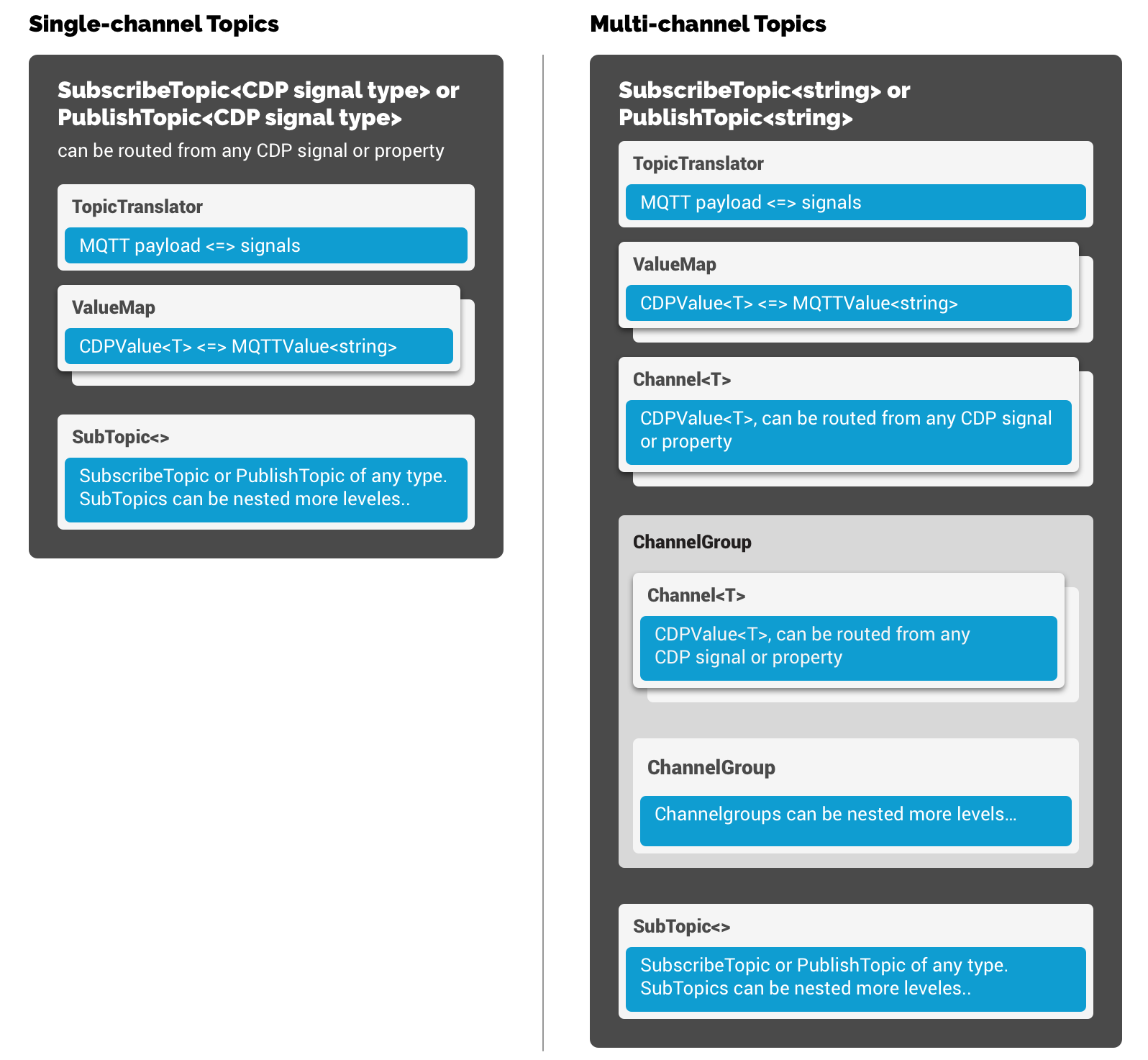
Topic can have many sub-elements like Translators, ValueMaps, Channels and SubTopics.
Following image shows hierarchy of PublishTopic/SubscribeTopic sub-elements:
Note: The length of PublishTopic<string> and SubscribeTopic<string> is limited only to MQTT payloads of 255 symbols or less. When you need to process longer payloads use complex topic types like PublishTopicChannelGroup or SubscribeTopicChannelGroup as described below - they provide support for unlimited MQTT payload length.
Channels
Multi-channel topics (PublishTopicChannelGroup and SubscribeTopicChannelGroup) have a Channel sub-element where multiple channels can be added into. These channels will then be used to receive or send the actual MQTT topic payload using translator, specified in Translator element. When no Translator is specified, default TextTranslator is used, that results sending and receives channel values in text format, line by line. Since this Channel sub-element can also contain ChannelGroups, complex tree-like structure can also be created. Channel-trees are most useful for JSONTranslator , where it will be used to send or receive channel values in JSON format.
Sub-topics
Sub-topics (SubTopic elements) can be added below every Topic. Nesting sub-topics allows user to group related topics together for easier management. Sub-topics are just like ordinary topics except that they inherit some of their parent properties:
| Property/Element | How sub-topic inherits from parent |
|---|---|
| Topic property | Sub-topic Topic string is relative to parent Topic string. F.e if parent Topic="/somedevice/command" and sub-topic Topic="currentstate" then actual SubTopic MQTT topic will be Topic="/somedevice/command/currentstate". |
| Translator element | Sub-topic inherits parent Translator (if left unspecified). |
| ValueMap elements | Sub-topic inherits parent topic ValueMaps. However ValueMaps can be overridden in sub-topic level. For example, if parent has mapped values 0<=>OFF and 1<=>ON, then sub-topic can possibly override only ValueMap 100<=>ON, to have mapped values 0<=>OFF and 100<=>ON. |
Get started with CDP Studio today
Let us help you take your great ideas and turn them into the products your customer will love.