
Redundant Sequencer-Based State-Machine Example
Introduction
The purpose of this example is to demonstrate how the redundancy framework can be used to make a redundant version of any control system very easily. Redundancy is crucial for mission-critical systems to ensure that the control system as a whole does not lose its function when some parts of the system fail.
CDP redundancy framework can be applied quite easily later on top of any existing CDP application, even when the redundancy requirement wasn't known or planned into the original application.
How to Run the Example
To run the example from CDP Studio, open Welcome mode and find it under Examples. Next, in Configure mode right-click on the system project and select Run & Connect. See the Running the Example Project tutorial for more information.
Project Overview
The example uses the Using Sequence Steps to Operate Doors example as a base and improves it so that the door controller becomes redundant for failures.
The example project consists of the following applications:
- DoorsEmulator - a separate application that emulates the door hardware, which is controlled and whose state is inspected over Modbus network protocol.
- ControlAppA and ControlAppB - two identical, redundant controllers to control the door and fetch their current state.
- GUI - contains widgets to display door state and lock positions/controls and the progress of ongoing operations.
The GUI application can be used exactly as described in the original example. See Using Sequence Steps to Operate Doors for more details about the application structure and controlling logic.
How To Convert Controller to Redundant Controller Set
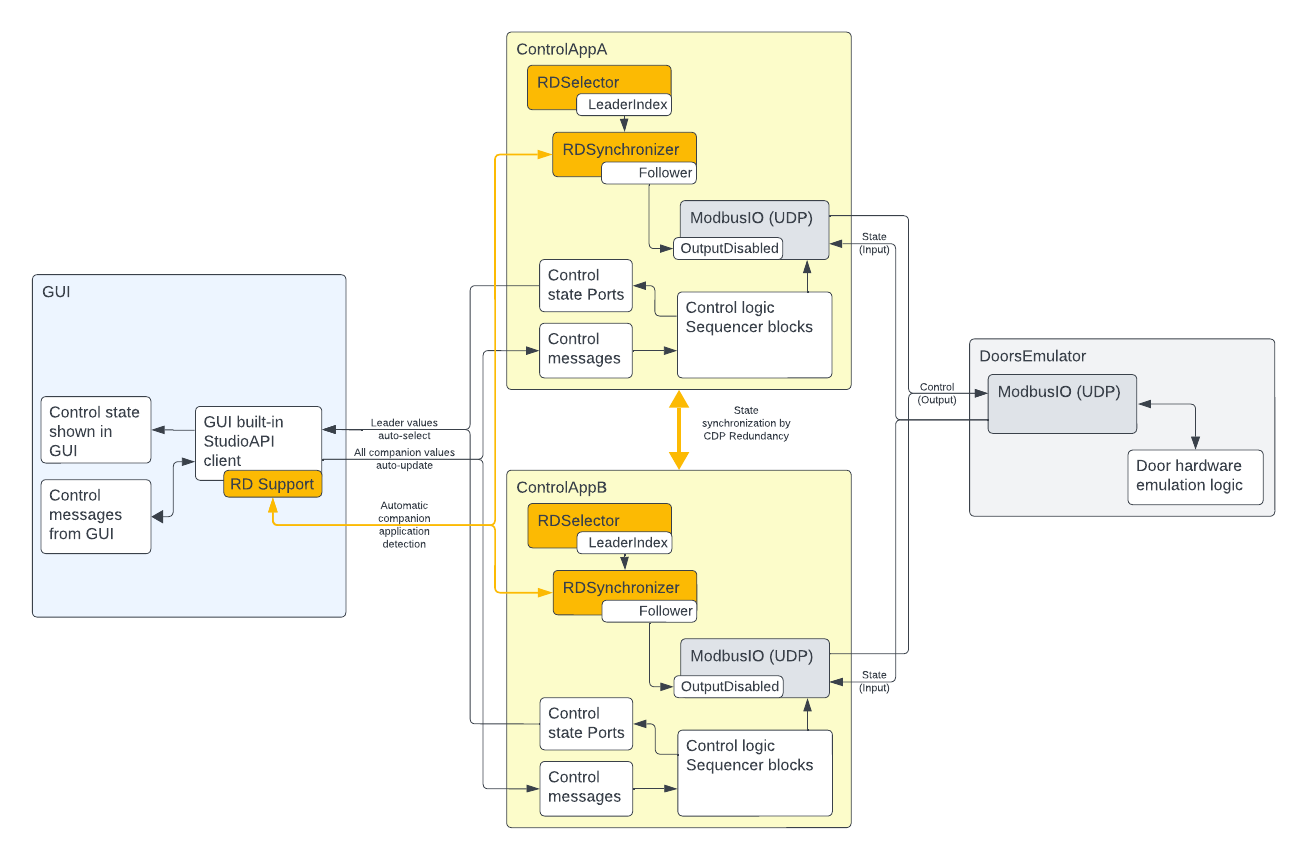
Converting an existing non-redundant CDP controller into a redundant controller set is quite simple. Only the following changes were needed:
- The application was cloned to a read-only re-syncable clone (ControlAppB) using CDP Studio application Clone... context menu.
- A RDSelector block was added to the ControlAppA application, and its RDAppList property was configured with redundant application names (ControlAppA;ControlAppB).
- A RDSynchronizer block was added to the application and its RDAppList property was configured similarly.
- The RDSelector LeaderIndex value was connected to the RDSynchronizer LeaderIndex input.
- The RDSynchronizer Follower signal was connected to the ModbusMasterUDP block OutputDisable signal. This disables the Modbus control packets sending from the controller that is currently in the follower state.
- And that is all that was needed to be changed on the controller side. The changes made to ControlAppA were now synced to the ControlAppB by using CDP Studio application Update From Source context menu.
As a result, the ControlAppA and ControlAppB make now a redundant application set, ready to take over the control in case the other one fails.
Note: Note that no RDNodeSync blocks need to be added to the application, as they are added automatically by the RDSynchronizer block, during startup, with suitable defaults to synchronize all the Sequencer blocks states inside the controller application.
How To Make GUI to Connect to Redundant Controller Set
There is no need to make any changes to the GUI application to connect it to the redundant controller set. When the Protocol parameter of CDP.CQP2Qt block in the GUI application is set to 2 - StudioAPI (the default), then there is no need for any other redundancy-related configuration. With this GUI redundancy support enabled, all widget routings in the GUI application .ui files pointing to any node in the redundant application set (i.e., ControlAppA or ControlAppB in our example) will be automatically connected to the current leader application node, at runtime.
Thereby, the GUI application always shows and controls the current leader controller, without any additional configuration need at GUI application side.
Note: For convenience, we also added an indicator pane to the GUI to show which controller is currently the leader. These values are also fetched automatically from the leader controller via the StudioAPI protocol redundancy support.
Testing the Redundancy
To test the redundancy in action, start the system. Similarly to the original Using Sequence Steps to Operate Doors example, after starting the system, it is possible to start two separate door control sequences from the GUI:
- Press Open Sequence to unlock and open the door
- Press Close Sequence to close and lock the door
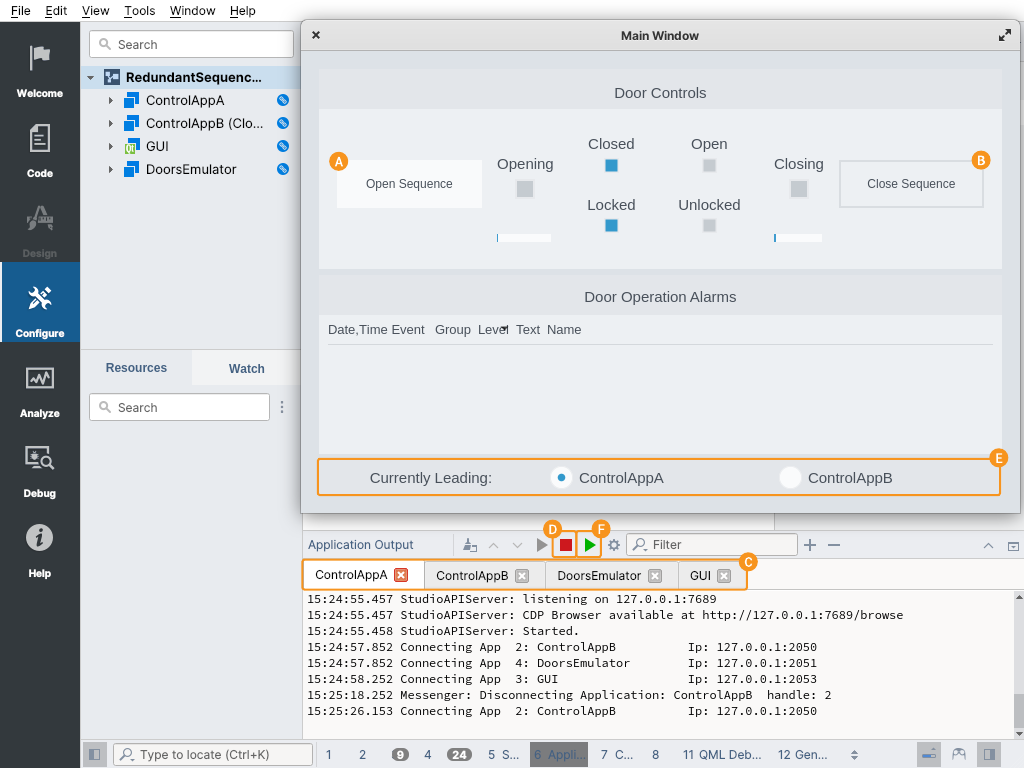
To simulate one of the controller's failure, stop the currently active controller (like ControlAppA). For that, select the application from CDP Studio Application Output pane application selector and then press the Stop button. You can then inspect the current leader indicator pane and see how the other controller takes over the control. You can also verify the door hardware state via the GUI and control it without any disturbance.
To simulate the failed controller recovery, press the Start button in CDP Studio Application Output pane for the stopped application (like ControllerA). After that, inspect that the re-started controller will not take over the control but is rather acting now as a follower, thus ready to take over the control again when the other controller fails (or is stopped).
You can repeat the above steps similarly to simulate the other controller failure and its recovery.
Note: Understandably, running this example on the local machine is for example and testing purposes only. For actual hardware failure protection, the redundant controllers should be configured to run on separate hardware.
For More Information
For more information about the Redundancy framework used in this example, see the Redundancy framework documentation.
Get started with CDP Studio today
Let us help you take your great ideas and turn them into the products your customer will love.