
TimescaleDatastore
Introduction
TimescaleDB (https://www.timescale.com/) is an open-source Postgres extension designed for running real-time analytics on time-series data. It is developed by Tiger Data and designed for high write throughput and efficient time-based queries, while still allowing you to use standard SQL and the Postgres ecosystem.
The CDP Logger TimescaleDatastore integration stores logged values and events in a Postgres database with the TimescaleDB extension enabled.
Quick Start
- Install Postgres and TimescaleDB (see Installing TimescaleDB) or use a cloud provider like TigerData Cloud. Use version 2.24.0 or newer of TimescaleDB.
- Add a CDP Logger component to your application as described in the How to Setup Logging in Automation System manual but use TimescaleDatastore.TimescaleDB as the datastore type instead of CDPCompactDatastore.
- Navigate into the TimescaleDB node and fill the following properties:
| Property | Example Value |
|---|---|
| ConnectionString | host=127.0.0.1 port=5432 user=postgres password=mypassword |
| DBName | mydatabase |
Configuration
Add TimescaleDatastore.TimescaleDB from the Resource tree to your CDP Logger component. The following are the most important properties to fill:
| Property | Description |
|---|---|
| ConnectionString | The libpq connection string used to connect to the PostgreSQL server, for example host=127.0.0.1 port=5432 user=postgres password=mypassword. The format is described at https://www.postgresql.org/docs/current/libpq-connect.html#LIBPQ-CONNSTRING. |
| DBName | Name of the database to use for logging and querying. If the database does not exist and the configured user has sufficient permissions, it is created automatically. It can be left empty if the database name is provided as part of the ConnectionString (see Advanced ConnectionString Usage below). |
| Schema | Optional schema name to use within the database. If left empty, the default schema will be used. The schema is created if it does not already exist. This is useful for separating logs from multiple applications within the same database. |
| ValueLogRetentionDays | Sets a TimescaleDB retention policy for logged values. Use 0 for no limit (it clears any existing TimescaleDB retention policy). If set to -1, it is assumed that retention is managed externally and no policy is created or removed. |
| EventLogRetentionDays | Sets a retention limit for logged events (e.g., CDPAlarms). Events older than the specified number of days are continuously deleted during logging. Use 0 for no limit. Note, this does not use TimescaleDB's native retention policy, but is enforced by the logger component because event data is stored in a relational way, not as a TimescaleDB hypertable. |
Note: The ValueLogRetentionDays uses the TimescaleDB native data retention policy, which is scheduled as a background job. The default schedule interval is 1 day, so deletions will not happen immediately after the data becomes older than the retention limit. If you need more immediate deletions, consider setting the ValueLogRetentionDays to -1 and managing retention externally (connect directly to the database and run "SELECT add_retention_policy('measurement', INTERVAL 'X');" with the desired interval X).
ValueAggregates
The ValueAggregates section is used to set up TimescaleDB continuous aggregate views on top of the raw logged data. These views pre-aggregate data into buckets of a specified width, which can significantly improve query performance for longer time ranges at the cost of some time resolution. For each bucket, the aggregate views store the minimum, maximum, and last values observed in each bucket for every logged node. Each aggregate can have its own retention policy, allowing you to optimize storage by keeping coarser aggregates for longer periods.
The aggregate with the smallest configured bucket width reads from the measurement table, while coarser aggregates are built hierarchically from the next finer aggregate to reduce server-side refresh cost. When reading data using CDP tools (see Viewing Data), the reader uses these tables automatically when the query resolution matches or is coarser than the aggregate bucket width, and falls back to the raw measurement table for finer-resolution reads. In case of different retention policies, the reader automatically combines data from the aggregates and the raw table to return the most complete result for the queried time range.
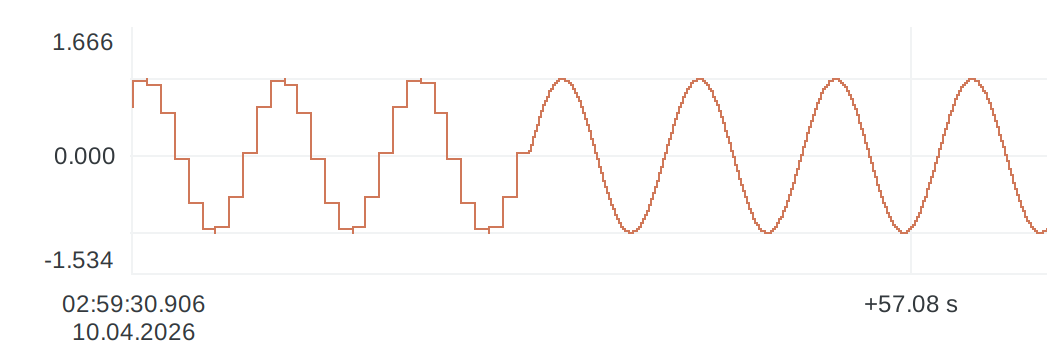
Each ValueAggregate has the following properties:
| Property | Description |
|---|---|
| Enabled | When unchecked, the row is ignored and no aggregate view is created for that row. Note, existing aggregate views are not automatically dropped when an aggregate node is disabled or removed; they are left in the database and treated as manually managed. |
| BucketWidthSec | Width of one aggregate bucket in seconds. Hierarchical aggregates must be multiples of the previous aggregate bucket width. Otherwise, an error is reported, the LoggerAlarm will be set, and the logging will not start until the configuration is fixed. |
| RetentionDays | Retention in days for the aggregate view. Use 0 for no limit or -1 to inherit ValueLogRetentionDays from the parent TimescaleDB datastore. |
By default, there are some pre-configured aggregates with commonly used bucket widths.
- PerSecond - bucket width
1s - PerMinute - bucket width
60s - PerHour - bucket width
3600s - PerDay - bucket width
86400s
If the defaults are not suitable, they can be disabled by unchecking the Enabled property. For each aggregate, the retention can be configured separately (the default is to inherit the retention from ValueLogRetentionDays).
New aggregates with custom bucket widths and retention policies can be added by adding new rows to the section. This is most useful when optimizing the bucket width and retention policy for your data, e.g. when per second log uses too much disk space, but per minute is too coarse for your queries, one could add a per 10 second aggregate with a retention of 6 months.
Modifying Aggregates
If the user stops the application, modifies ValueAggregates, and starts it again:
- Newly added aggregates are created automatically.
- Changing only the RetentionDays updates the retention policy of the existing aggregate view. This is the only option that can be modified during runtime, as changing it does not require dropping and re-creating the view.
- Aggregates that are removed from configuration, or set Enabled=
false, are not dropped automatically; existing aggregate views are left in the database and treated as manually managed. - Changing the BucketWidthSec creates a different aggregate view name, so a new view is created, while the old view is left in the database until it is removed manually.
Note: TimescaleReader discovers aggregate views from the database matching the pattern measurement_agg_Xs, where X is the bucket width in seconds, and uses them when appropriate for queries, regardless of whether they are currently listed in the ValueAggregates configuration or not. Therefore, obsolete aggregate views may still be used for queries until they are dropped manually (for example, with DROP MATERIALIZED VIEW measurement_agg_60s CASCADE;).
When modifying aggregates after they are created, it is often easier to drop and re-create the database or schema to avoid having obsolete views with incorrect retention policies. If that is not possible, make sure to clean up the obsolete views manually.
Advanced ConnectionString Usage
The ConnectionString property is passed to the PostgreSQL client library (libpq) and supports the same formats and environment-variable behavior described in the PostgreSQL documentation.
URI Format
In addition to the keyword/value connection string format (host=... port=... user=...), there is partial support for URI connection strings (for example, postgresql://user:password@host:5432/mydb).
When using a URI, the database name must be included in the URI. In that case, leave the DBName property empty. Automatic database creation is not supported when the database name comes from the URI.
Environment Variables
Connection parameters can also be provided via libpq environment variables, as described in PostgreSQL documentation. Here are some examples of common variables:
PGHOST=127.0.0.1PGPORT=5432PGUSER=fooPGPASSWORD=barPGDATABASE=mydb
It is allowed to mix connection string parameters with environment variables (for example, only specifying the password via PGPASSWORD).
If the database name is specified via PGDATABASE, leave DBName empty. Automatic database creation is not supported in that case.
Other Properties
When disabling the Hide Internal Items filter, some additional properties become visible. It is normally not necessary to access them.
| Property | Description |
|---|---|
| MaxConcurrentReaders | Maximum number of concurrent read threads used for serving queries. Set to 0 to disable data reading. |
Installing TimescaleDB
The TimescaleDB datastore requires a running PostgreSQL server with the TimescaleDB extension enabled. You can either install it locally or use a managed provider.
For official installation instructions, see TimescaleDB installation documentation.
Roles and Permissions
TimescaleDatastore connects to PostgreSQL using the configured libpq ConnectionString. While it is easy to get started using a superuser account (for example postgres), for security, prefer a dedicated, least-privileged role for the application and avoid using superuser accounts for normal logging.
If the writer is configured with sufficient permissions, it will:
- Create the target database (if it does not exist and DBName is set)
- Enable the TimescaleDB extension in the database (if not already enabled - most TimescaleDB installations enable it by default for new databases)
- Create the target schema (if the optional Schema property is set and the schema does not exist)
- Create the required tables and indexes (if they do not exist)
- Create and maintain continuous aggregate views and their policies for the configured ValueAggregates
- Write, read, update, and delete data in the tables as needed
- Set a TimescaleDB retention policy based on the ValueLogRetentionDays property (if applicable). Note, the EventLogRetentionDays is enforced by deleting old events during logging, so a delete permission on the event table is enough.
This, however, requires elevated permissions. If the database, schema, and tables are provisioned ahead of time (for example, as part of a deployment or migration process), the connected role can be more limited in what it needs to do.
Note: In PostgreSQL/TimescaleDB context, a role with the LOGIN privilege is equivalent to a user. In this manual, the terms are used interchangeably.
Common Scenarios
The Role Has CREATE DATABASE Privilege
CREATE ROLE cdp_timescale_writer
  LOGIN PASSWORD 'change-me'
  CREATEDB;
If the user (role) connected via ConnectionString has permission to create databases, and the target database (from DBName) does not exist, TimescaleDatastore will create it, and as the owner of the database, it will have sufficient permissions to create the schema and tables as needed.
Database and Schema Already Exist
In this scenario, the target database and schema already exist, but the role must have sufficient permissions to create and maintain the tables.
CREATE ROLE cdp_timescale_writer
  LOGIN PASSWORD 'change-me';

GRANT CONNECT ON DATABASE mydb TO cdp_timescale_writer;
GRANT USAGE ON SCHEMA myschema TO cdp_timescale_writer;
GRANT ALL PRIVILEGES ON SCHEMA myschema TO cdp_timescale_writer;
Tables Already Exist
If the schema and tables already exist, the connected role only needs permission to read and write the tables.
CREATE ROLE cdp_timescale_writer
  LOGIN PASSWORD 'change-me';

GRANT CONNECT ON DATABASE mydb TO cdp_timescale_writer;
GRANT USAGE ON SCHEMA myschema TO cdp_timescale_writer;
GRANT SELECT, INSERT, UPDATE, DELETE ON ALL TABLES IN SCHEMA myschema TO cdp_timescale_writer;
These are the minimal permissions the writer needs to function. But in this scenario, the schema, tables, aggregate views, and retention policies must be provisioned ahead of time (set ValueLogRetentionDays to -1). If aggregate views are used, their RetentionDays should also be left at -1 (meaning retention settings are inherited from ValueLogRetentionDays), so the limited role does not need to manage aggregate retention policies. This can be done by running the TimescaleDatastore once with a more privileged role and then changing to this limited role later.
Viewing Logged Data
Through CDP Logger's Built-in Server
Logged data can be accessed through CDP Logger's built-in server. That includes CDP Studio Analyze mode, no-code blocks, and clients for Python, and Javascript. See the Viewing Data section in the CDP Logger manual.
The upside of using this method rather than direct database access is that one can just query data without needing to understand which tables to join or how the data is stored.
Direct Database Access
For direct database access, any PostgreSQL tool can be used (for example psql), and the data can be visualized with third-party tools such as Grafana. To access the data programmatically from C++, you can use the CDP2SQL Postgres integration. See the Framework - CDP2SQL manual for a description of how to connect to a Postgres database and run queries. The database format is described below.
The direct database access can also be used for maintenance tasks, such as deleting old data, configuring retention policies, compression, setting up custom continuous aggregates, and so on. Consult the TimescaleDB documentation for details on these features.
Database Format
The datastore creates several tables for keeping logged values, events, and metainfo.
Value Logging
Logged values are stored in a TimescaleDB hypertable named measurement. Each row represents one value change for one logged node at one point in time:
| Column | Description |
|---|---|
timestamp | A TIMESTAMPTZ stored with microsecond precision showing when the node value was measured. |
node_id | Integer id of the logged node (use the node table for mapping it to node names and paths). |
value_type | The original value type of the logged node. See Value Types for the numeric mapping. 0 means the value is NULL, which is often used to mark the moment the logger was closed (meaning the value after that point is unknown). |
value_f64, value_i64, value_u64, value_text | The stored value. Exactly one of these is set for each row (unless value_type is undefined). |
logstamp | A TIMESTAMPTZ stored with microsecond precision showing when the node value was written to the database. This is useful to detect updates in the database when values are written out of order. |
The table is created as a hypertable partitioned by timestamp and node_id, and indexed for efficient per-node time range queries.
Note: Only value changes are logged. If a value does not change, no new row is created and one should presume the value has not changed. When the logger is closed, a row with NULL values is created to mark the end of logging.
The table above preserves the original CDP value types using separate typed columns, which avoids lossy type conversions. However, this can make querying with third-party SQL tools more complex, since one must check the value_type column and select the appropriate typed column for each row. If some loss of precision is acceptable, one could create a view that normalizes the value into a single column with a consistent type (for example, double precision or text), which simplifies querying. Similarly, one could map node_id to the node name for more intuitive queries. Here is an example view definition:
CREATE OR REPLACE VIEW measurement_with_helpers AS
SELECT
    m.timestamp,
    m.node_id,
    n.name AS node_name,
    m.value_type,
    COALESCE(m.value_f64, m.value_i64::double precision, m.value_u64::double precision ) AS value_as_double,
    COALESCE( m.value_text, m.value_i64::text, m.value_u64::text, m.value_f64::text ) AS value_as_text,
    m.logstamp
FROM measurement m
JOIN node n ON n.id = m.node_id;
Continuous Aggregate Views
Each enabled ValueAggregate creates one continuous aggregate view named like measurement_agg_1s or measurement_agg_3600s (the number in the name corresponds to the bucket width in seconds). The view schema is:
| Column | Description |
|---|---|
bucket_start | Start timestamp of the aggregate bucket - a TIMESTAMPTZ value stored with microsecond precision. |
node_id | Integer id of the logged node (use the node table for mapping it to node names and paths). |
value_type | The original value type of the logged node. See Value Types for the numeric mapping. 0 means the value is NULL, which is often used to mark the moment the logger was closed (meaning the value after that point is unknown). |
min_f64, min_i64, min_u64, min_text | Minimum value seen in the bucket, stored in the typed column matching the logged value type. |
max_f64, max_i64, max_u64, max_text | Maximum value seen in the bucket, stored in the typed column matching the logged value type. |
last_f64, last_i64, last_u64, last_text | Last value seen in the bucket, stored in the typed column matching the logged value type. |
logstamp | A TIMESTAMPTZ stored with microsecond precision showing when the bucket was last updated. This is useful to detect changes in the database when values are written out of order. |
The smallest aggregate reads from the raw measurement hypertable. Coarser aggregates are built from the next finer aggregate view instead of re-reading the full raw history.
Value Types
The value_type column stores the original CDP value type of the logged node as an integer:
| Value | Type |
|---|---|
0 | undefined |
1 | double |
2 | uint64 |
3 | int64 |
4 | float |
5 | unsigned int |
6 | int |
7 | unsigned short |
8 | short |
9 | unsigned char |
10 | char |
11 | bool |
12 | string |
The corresponding value is stored in one of the typed columns:
stringusesvalue_text.doubleandfloatusevalue_f64.uint64usesvalue_u64.- All other integer-like types use
value_i64(interpret/cast based onvalue_type). - In case of
undefined, allvalue_*columns areNULL. This is used to mark the moment the logger was closed (meaning the value after that point is unknown).
Node Info
The table named node contains basic information about logged nodes. It maps measurement.node_id value to node name, type and path.
| Column | Description |
|---|---|
id | Integer id referenced by measurement.node_id. |
name | The node name (unique). |
type | The CDP value type of the node. |
path | The node path (full Routing). |
Note: Node ids are stable across restarts as long as the LoggedValue Name stays the same. If an existing node is found by name but has a different path, the path is updated to match the current configuration.
Node Tags
The table named nodetag stores for each logged node the tags fetched by CDP Logger TagLookup (key, value, and source) rules and any custom tags listed by the user in the LoggedValues table.
| Column | Description |
|---|---|
node_name | The node name. References node.name. |
key | The tag key. |
value | The tag value. |
source | The tag source. Usually, the full path (Routing) to the node that provided the tag value. |
Event Logging
The table named event stores logged CDP events. Each row represents one event emitted by an event sender.
| Column | Description |
|---|---|
id | Internal primary key for the row. Used to reference related rows in the eventdata table. |
timestamp | The time when the CDP event occurred. A TIMESTAMPTZ value stored with microsecond precision. |
event_id | The unique identifier for the CDP event. Note the id is only unique until the application is restarted, so check both the timestamp and the event_id when comparing historical events. |
sender | The path (full Routing) to the node that generated the CDP event. Matches eventtag.sender to associate tags with the event. |
code | CDP Event code flags. See below for details. |
status | The new status of the object that caused the CDP event after the CDP event occurred. For alarms, see the Alarm Status Defines in CDPAlarm documentation. |
logstamp | The time the CDP event was received by the logger component. Note: there is a separate timestamp column for the time when the CDP event occurred. Useful when polling the database for new events, as in a multi-application system, the events might arrive out of order. Also useful, when handling CDP event reprises because for reprises, the initial timestamp is repeated. |
Event Data
The table named eventdata stores extra key-value data associated with each logged CDP event. For example, CDPAlarm events provide the Text, Group and Level of the alarm in the payload.
| Column | Description |
|---|---|
id | Event row id. References event.id. |
key | Event data key. |
value | Event data value. |
The primary key is (id, key).
Event Tags
The table named eventtag stores tags fetched by CDP Logger TagLookup (key, value, and source) rules for each node that generates events. The Tags are associated with an event via event.sender = eventtag.sender.
| Column | Description |
|---|---|
sender | The event sender path (full Routing). Matches event.sender. |
key | The tag key. Can be NULL when a sender has no tags. |
value | The tag value. Can be NULL when a sender has no tags. |
source | The tag source. Can be NULL when a sender has no tags. |
The uniqueness constraint is UNIQUE(sender, key).
CDP Event Code Flags
Common event codes used in the CDP framework (note that multiple flags can be set at the same time):
| Name | Code | Description |
|---|---|---|
| AlarmSet | 0x1 | The alarm's Set flag/state was set. The alarm changed state to "Unack-Set" (The Unack flag was set if not already set). |
| AlarmClr | 0x2 | The alarm's Set flag was cleared. The Unack state is unchanged. |
| AlarmAck | 0x4 | The alarm changed state from "Unacknowledged" to "Acknowledged". The Set state is unchanged. |
| AlarmReprise | 0x40 | A repetition/update of an event that has been reported before. Courtesy of late subscribers. |
| SourceObjectUnavailable | 0x100 | The provider of the event has become unavailable (disconnected or similar). |
| NodeBoot | 0x40000000 | The provider reports that the CDPEventNode has just booted. |
Metainfo
The table named keyvalue stores the schema version and some logging parameters, such as LoggingFrequency.
| Column | Description |
|---|---|
key | The parameter name (primary key). |
value | The parameter value. |
It is normally not needed to access this table directly.
Get started with CDP Studio today
Let us help you take your great ideas and turn them into the products your customer will love.